.png?width=150&height=40&name=102723_ClowderLogo%20(1).png)
.png?width=127&height=34&name=102723_ClowderLogo%20(1).png)
Trade & Professional Associations
Dedicated space for your members to connect and engage with each other.


Increase member engagement with news feeds, a resource hub, and more.



Clowder 4.5 marks a meaningful step forward in how members manage their identity and connect during events. This release brings a fully redesigned profile experience, more intuitive account management, and powerful upgrades to 1:1 meetings and event personalization. Together, these updates make it easier for users to engage, schedule, and navigate their community while giving administrators more flexibility behind the scenes.

One of the most significant updates in this release is the complete overhaul of the My Profile experience. Profile and settings have now been consolidated into a single, streamlined interface. This eliminates friction and makes it easier for users to manage everything in one place.
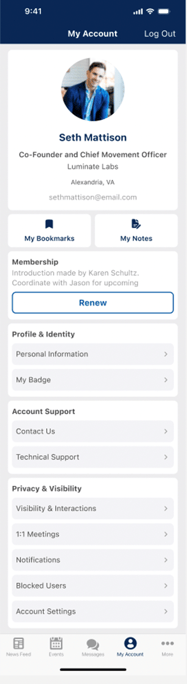 What's new The profile experience has been fully redesigned with a unified Profile and Settings interface, bringing account management, personal information, privacy controls, and notifications into one centralized space. Users can now easily access bookmarks and notes through dedicated tiles, manage membership details, view enhanced profile states, and take advantage of richer identity features like badges and presence indicators.
Why it matters Users no longer need to jump between multiple areas to manage their account, preferences, and activity. This unified experience reduces confusion and improves engagement by making key actions more accessible.
Challenge addressed Previously, profile management was fragmented across different parts of the platform. This update centralizes those touchpoints and creates a more intuitive and modern user experience.
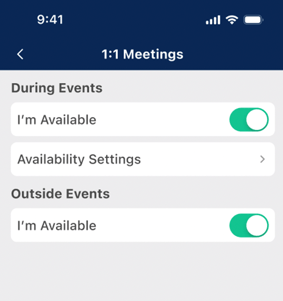
Clowder 4.5.0 introduces major enhancements to 1:1 meetings, giving both users and admins more control over scheduling, availability, and logistics.
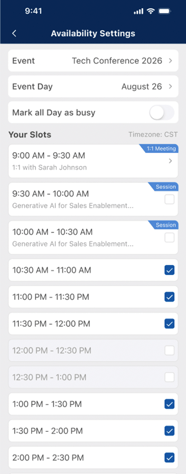 What's new 1:1 meetings are now powered by structured time slots and flexible location management, with support for both automatic and manual assignment. Users can define their availability while the system intelligently filters and resolves conflicts. Administrators gain expanded control with event-level configuration, bulk actions, improved time formatting, and automatic updates when schedules change.
Why it matters These updates make it significantly easier to coordinate meaningful connections at events. Structured scheduling reduces friction and helps ensure meetings happen efficiently.
Challenge addressed: Previously, managing 1:1 meetings, especially at scale, could be complex and manual. With structured slots, location handling, and admin controls, the process is now far more scalable and user-friendly.
Attendees can now create and manage their own personal event sessions, bringing a new level of customization to event participation.
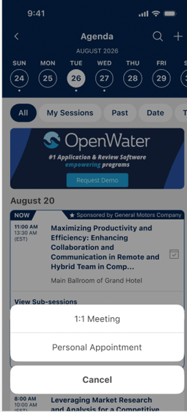 What's new Users can now create, edit, and manage personal sessions directly within the event agenda, allowing them to build a customized schedule that includes their own plans alongside official programming.
Why it matters Users can now tailor their event experience beyond the standard agenda by organizing meetings, notes, or personal plans in one place.
Challenge addressed Event agendas were previously static. This update empowers attendees to personalize their schedule and improves engagement and organization during events.
This release also delivers a strong set of enhancements based directly on client feedback.
What's new Client-requested updates bring more flexibility and control across events and content, including optional exhibitor and speaker logos, configurable attendee visibility, enhanced poll settings, richer resource displays, interactive exhibitor materials, and improved push notification management.
Beyond the headline features, this release includes a range of updates that improve usability, consistency, and administrative control.
What's new This release introduces a more consistent experience across the platform with unified bookmarks, improved authentication flows, and enhanced filtering behavior. It also includes expanded admin capabilities such as better ad placement controls, updates to QR and booth wallet functionality, and the removal of outdated features to streamline the overall experience.
If you have questions about how to take advantage of these new features, connect with your Client Advisor. We are here to help you get the most out of Clowder.